

Fabric Apps and Rayfin: BI Is Getting an “Act” Button
What changes for Power BI and Microsoft Fabric professionals now that the platform is starting to host action — not just analysis.
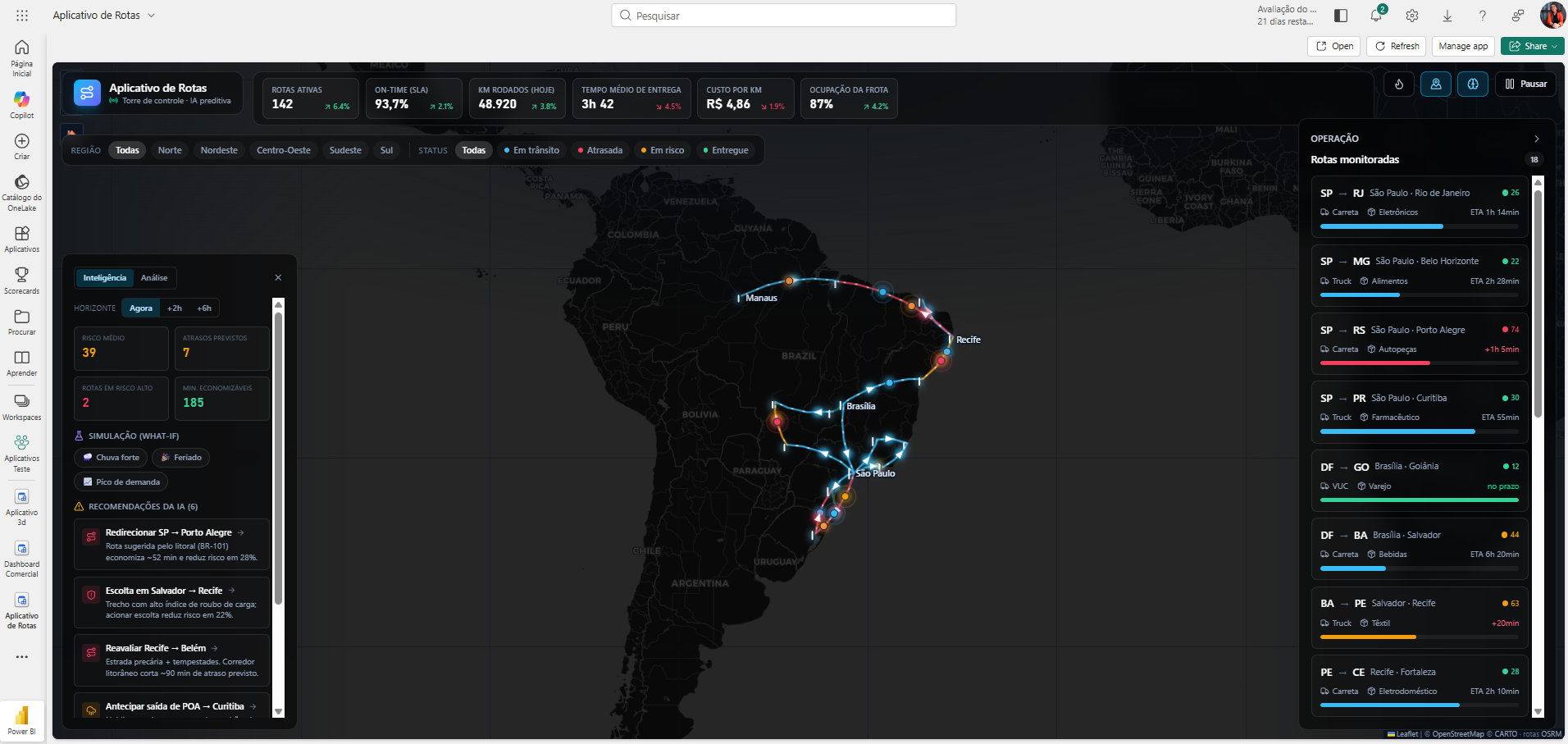
By Tamires Cavani | August 18, 2026
An operations analyst opens the inventory dashboard every morning. Today, a distribution center shows a stockout risk for a fast-moving product. She knows exactly what needs to happen: open an emergency replenishment request.
But that request doesn’t get resolved inside the report. She writes down the product code, leaves Power BI, opens the purchasing system, finds the right supplier, fills out a form, and sends it for approval. Days later, she goes back to the dashboard just to check whether the replenishment arrived in time.
The report did its job: it showed the problem. Solving the problem, though, happened somewhere else, with a different tool, outside the flow where the data was found.
That gap — between “I saw the problem” and “I solved the problem” — is exactly what Microsoft Fabric started addressing with two announcements at Build 2026: Fabric Apps and Rayfin.
What a Fabric App actually is
According to Microsoft’s official documentation, Fabric Apps (still in preview) is a managed application layer inside your own Fabric tenant: a new workspace item type that runs as a full application — with a database, authentication, and hosting — without leaving the environment where the data already lives.
In practice, that means building a screen designed for a specific task — “approve inventory replenishment,” “review at-risk customers,” “release a discount” — that both consumes Fabric data and writes new data, all under the same governance that already protects your Power BI reports.
Does this replace Power BI? No — it solves a different problem
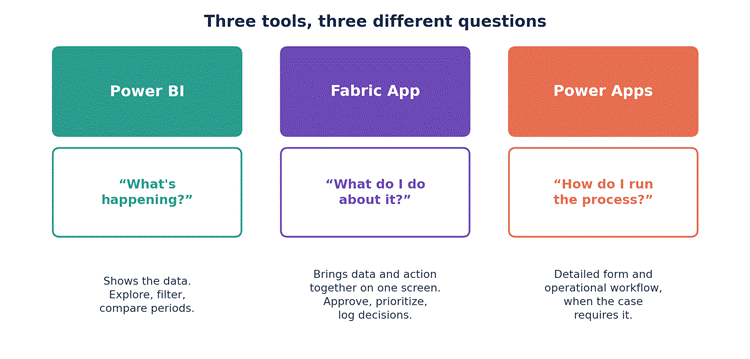
Three tools in the Microsoft ecosystem, three different questions each one answers best.
Power BI remains the right tool for answering “what’s happening”: exploring, comparing, spotting trends. A Fabric App comes in after that question, when the answer calls for a decision inside the workflow itself. And when the process is long and full of steps — a complex form, a multi-layer approval — Power Apps is still, today, the more mature tool.
They’re three tools for three different moments of the same process, not one replacing another.
Where Rayfin fits in
If the Fabric App is the application, Rayfin is what builds the engine behind it.
Announced as an open-source project (MIT license) at Build 2026, Rayfin is an SDK and CLI that lets you describe an entire application backend in TypeScript — data model, access rules, business logic — and publish all of it to Fabric with a single command, npx rayfin up.
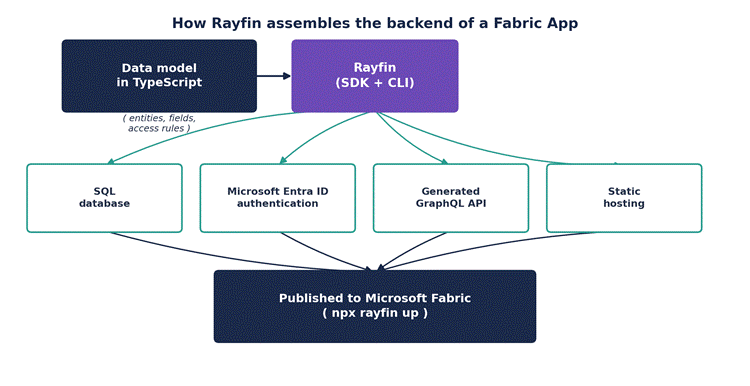
From a single TypeScript model, Rayfin generates the pieces that would normally be assembled one by one.
From that definition, Rayfin automatically provisions a SQL database inside Fabric, authentication via Microsoft Entra ID, a GraphQL API, and static hosting connected to OneLake. The developer doesn’t assemble these pieces by hand: they declare the model, and the tool builds the infrastructure.
One detail worth noting for anyone thinking about data architecture: the data the application generates is born inside OneLake, available to the rest of Fabric — notebooks, pipelines, Power BI — without needing to build a separate ETL pipeline just to bring it in.
Two kinds of applications call for two different architectures
Not every application needs to write data. And that’s where a common confusion lives: treating “Fabric App” as automatically synonymous with “SQL Database.” It isn’t quite like that.
When the application is read-only — the simplest example is a goals-and-KPIs dashboard any manager can open without needing to change anything — the data can come straight from an existing Lakehouse or Semantic Model. There’s no reason to create a transactional layer just because the interface is new.
When the application needs to record a decision — like in the replenishment example — that’s where Fabric’s SQL Database comes in, built exactly for that kind of load: current-state records, approvals, work queues.
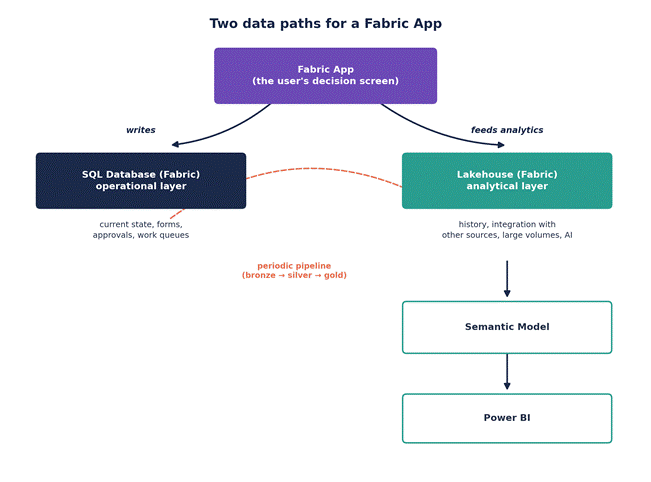
What gets written day to day and what feeds historical analysis take different paths — and later meet again.
The two sides don’t compete: the SQL Database handles the “now” — the request is pending, approved, or rejected — while the Lakehouse accumulates the history of those decisions over time, usually moved by a pipeline that follows the bronze-silver-gold pattern. That history is what feeds back into the Semantic Model and, in turn, Power BI.
Back to the inventory example
- The analyst opens the Fabric App and sees the stockout alert, with the product’s consumption history right next to it.
- She triggers “request emergency replenishment.” The request is written to Fabric’s SQL Database, with status “pending.”
- A supply chain lead gets notified, opens the same app, reviews the impact, and approves it.
- The status changes to “approved” — still inside the SQL Database.
- A pipeline moves that record to the Lakehouse, where it becomes part of the replenishment history.
- In Power BI, an operations report now shows average approval time, stockouts avoided, and emergency replenishment cost by region.
The action the analyst took inside the app becomes, a few steps later, data that someone else will analyze in a report. It’s a cycle, not a one-way street.
The Semantic Model doesn’t lose ground — it gains another consumer
Worth highlighting for anyone who has already invested time modeling data in Fabric: none of this retires the Semantic Model. Quite the opposite. Relationships, DAX measures, and RLS rules that already exist remain the business-rules layer — except now they can be consumed by more than one place at once: a Power BI report, a Fabric App, and, increasingly, AI agents.
That avoids duplicating business logic in every new application. But it also raises the bar for quality: a wrong measure or a misconfigured RLS rule can now propagate to more places than just a single dashboard.
The same identity handles security across every layer
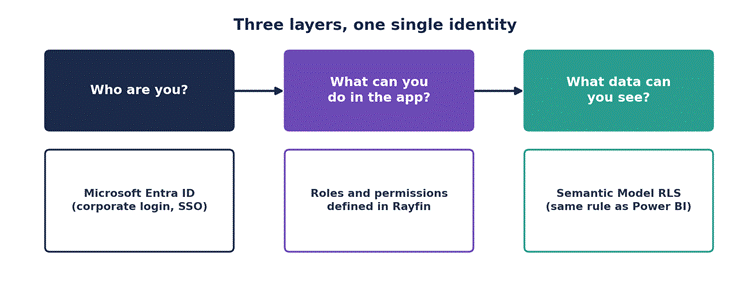
Authentication, application permissions, and semantic-model security rules work together, not in parallel.
Fabric Apps uses authentication via Microsoft Entra ID — the same corporate login already used across the rest of Microsoft 365 and Fabric. That answers “who are you.” The permissions defined alongside the model in Rayfin answer “what can you do inside the app.” And when the application queries a Semantic Model, the RLS rules that already protect that model still apply — answering “what data can you see.”
There’s no need to invent a second security architecture just because there’s a new application. The one that already protects the BI environment gets reused.
Do you need AI to build this? No — but it helps a lot
Microsoft has positioned GitHub Copilot as the recommended way to write a Fabric App’s code, and it’s common to see AI agents — Copilot, Claude, Cursor — speeding up that development. But that’s an option, not a requirement: since Rayfin works with plain TypeScript, any developer can write that code by hand, without relying on an agent.
AI speeds up writing the code. What actually builds and publishes the application is Rayfin.
How to decide between Power BI, Fabric App, and Power Apps
- Just want to distribute analytics and KPIs? Power BI does the job.
- Does the process require a long form and an already-mature operational workflow, with multi-layer approvals? Power Apps is still, today, the more stable choice.
- Want to build an experience that brings data and decision together in one place, inside Fabric? A Fabric App is worth investigating.
- Just need the user to write a value directly from inside a Power BI report, without building a new application? That already exists today through Translytical Task Flows — an independent feature that doesn’t depend on Rayfin or the Fabric Apps item.
It’s still preview — and that matters in practice
Fabric Apps and Rayfin entered public preview at Build 2026, in June, and as of now there’s no confirmed general-availability date. That has concrete consequences: Microsoft doesn’t guarantee a production SLA for the feature, CLI commands and deployment formats can change without notice, capacity-consumption pricing hasn’t been published yet, and regional availability is limited — worth checking Fabric’s regional availability page before planning any project. You also need dedicated Fabric capacity; the feature doesn’t work on shared capacity or in Power BI Pro workspaces.
That doesn’t invalidate the concept, but it does clearly point to the right moment to experiment: proof of concept and internal tools, yes; a critical production application with many users, not yet.
What this changes for people working in BI
This shift doesn’t mean every BI professional needs to become a full-stack developer. But it does suggest a real shift in the question that guides a data project.
For years, the central question was: “how do I show this data in the best way?”
The next question is: “what does the person looking at this data need to do next — and can that action fit inside the analytical experience itself?”
The path from dashboard → insight → decision → action stops being a process scattered across three or four different systems and starts fitting inside the same platform where the data already lives. For people working with Fabric and Power BI, understanding this architecture now — even in preview — is a way to be ready when it matures.